
DSS billing that starts with attendance
Each day a participant attends is a unit on your DSS invoice. At month end you check the numbers and download the file. No counting sign-in sheets.
What the invoice looks like
This is the real invoice screen, shown with sample participants.
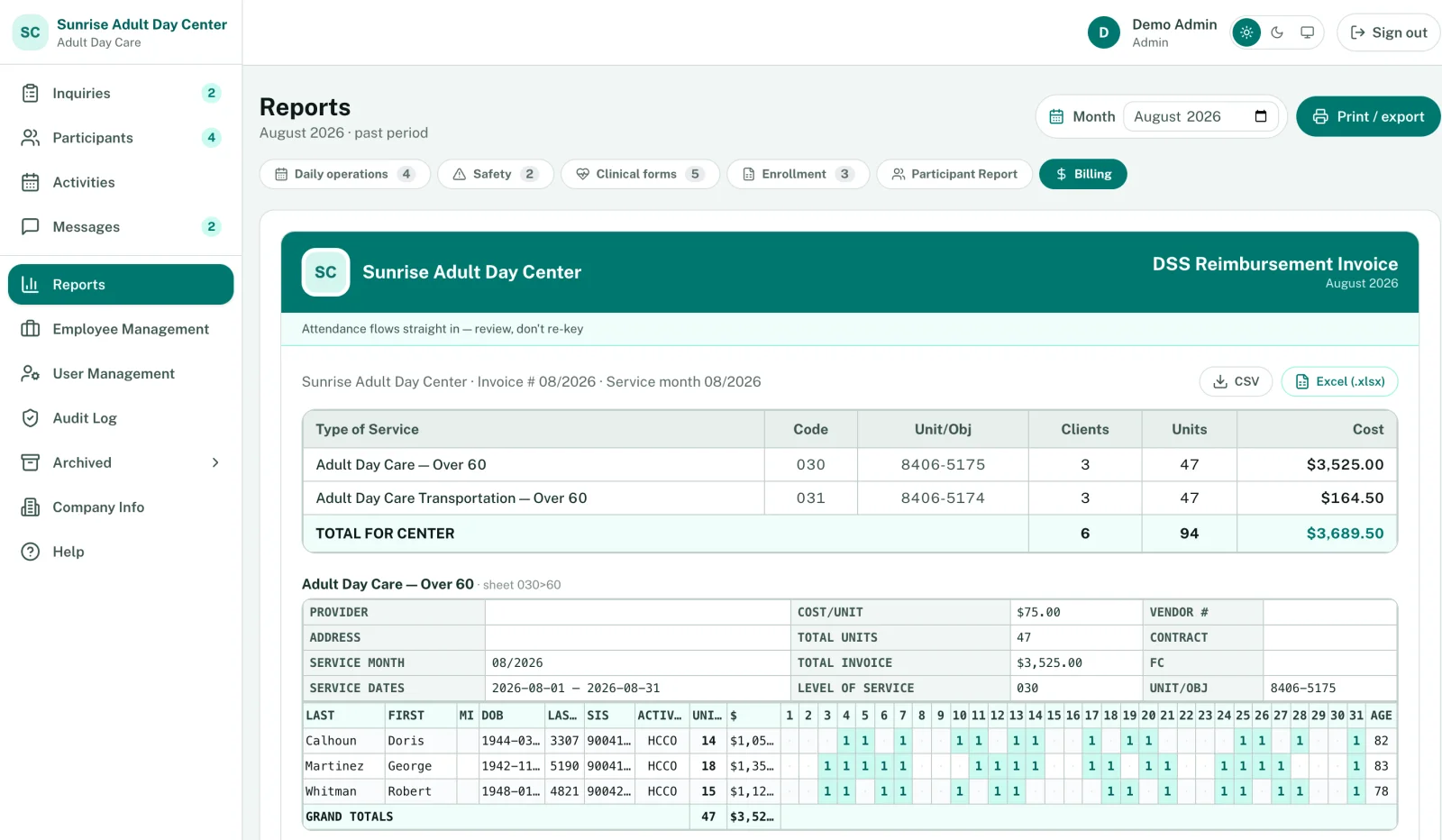
- Download a CSV, or an Excel file laid out like the DSS template.
- Totals for each service code: clients, units and cost.
- One sheet per service and age group, such as 030 over 60.
- Each day someone attended shows as a 1. Nobody typed these in.
Not everyone is on DSS
Set each participant's funding source: Private Pay, DSS, Medicaid CAP or VA. Private pay families get invoices they can pay online, and their payment history sits next to your DSS billing.
More than one contract
If you bill under more than one DSS contract, add each company with its own rates and choose the company on each participant. Each gets its own invoice.
Attendance, meals, transportation and the other state reports are covered on the features page.
Billing questions
Want to see it with your own DSS setup? Book a demo
Which funding sources can we track?
What about private pay families?
We bill under two DSS contracts. Does that work?
What do we send to DSS?
How is billing information protected?
See your own DSS invoice build itself
Book a demo and we'll walk through your DSS setup, or start a free trial with your own roster.